


InIn today’s AI era, many things people struggled with in the past can be explained and presented easily by these new AI tools. You can use one of many agent / AI tools to build entire platforms that will help you do your work, instead of purchasing services — you become the owner of your own AI-prompted creation — that is tempting for many of us.
In this short article, I want to present a solution to a simple problem that, thanks to AI, has become a regular tool that can be adjusted/modified to your needs.
The problem
How would you approach this task?
“You are given a list of patients for treatment, you need to call them manually and obtain preferred online visit dates/times for an initial 50-minute session. Please propose an algorithm to schedule patients’ visits, given that each patient may offer multiple date/time slots and that the target doctor has limited time slots in a separate calendar file called doctor-calendar.csv. Bear in mind that the minimal time between 2 consecutive visits is 10 minutes”.
As an author of the requirement, I intentionally suggest a way to proceed, but treat this as an exercise — you can rephrase it in your own words and reiterate a bit later.
How to proceed? — I can tell you what I would do.
The Author’s contextual knowledge
I start with what I already know.
First of all, this is a scheduling problem. Second, you want a systematic approach to planning for yourself or your end user.

I ask the AI to select the optimal ways to solve the scheduling problem. A hint — this was easier for me to start with, because I already know about the existence of SAT problems [1] and a SAT solver, as well as greedy algorithms and heuristics (that is my basic understanding in this area).
My question to AI is: “Is the greedy schedule more efficient than using a SAT solver like python-sat, CaDiCal?” [2]
The answer:
Greedy is computationally cheaper than running a SAT solver like python-sat + CaDiCaL for this specific “patients choose from discrete start-times” problem. But “cheaper” isn’t the same as “better,” because SAT can give you optimality guarantees (max #scheduled, best preference satisfaction, fairness, etc.).
What your problem actually is (with your current model)
If each patient provides a set of exact acceptable start times, and each start time can be used by at most one patient (because you model the 50+10 buffer as a 60-minute block), then the core problem is:
Bipartite matching
Left side: patients
Right side: discrete candidate start slots
Edge exists if the patient accepts that slot.
Goal: assign each patient to at most one slot, each slot to at most one patient
This has polynomial-time optimal algorithms (e.g., Hopcroft–Karp for maximum matching). That means you don’t need the SAT at all to be optimal
Let’s proceed with what AI advised:
Greedy (Minimum Remaining Values + least-contention)
Runtime: typically, tiny (milliseconds) for tens/hundreds of patients
Overhead: minimal (no encoding).
Works well online: great for scheduling live phone calls.
Downside: optimality is not guaranteed. It can “paint itself into a corner” in adversarial cases.
I will skip, for now, the advantages of using a SAT solver in a deep analysis. Consider it for now; it has some use cases that greedy may not be the best fit. I also highly recommend reading [1].
The Prompt and solution
Regarding the greedy scheduler part, after a few description steps, I managed to come up with this prompt that generates a Python command-line scheduler (self-described by the AI model on my request):
You are a senior Python engineer. Generate a single-file Python 3.10+ CLI program named `schedule_patients.py` that schedules initial online visits for ONE doctor (but design the code so it can be easily extended to multiple doctors).

GOAL
- Read doctor availability from a CSV file `xxx-doctor-calendar.csv`.
- Read patients and their proposed start times from a CSV file `patients_proposals.csv`.
- Produce a schedule CSV `schedule_out.csv` that assigns each patient to at most one appointment start time.
- STRICTLY PREVENT OVERLAPPING APPOINTMENTS for the same doctor.
- Each booked appointment occupies a block of length (session_minutes + buffer_minutes). Default is 50 + 10 = 60.
- Validate final schedule has no overlaps; if it does, fail with a clear error.

INPUTS

1) Doctor availability CSV format:
Columns: doctor_name,date_of_slot,duration_minutes

Example:
Mario,2026_02_11_09_00,660

Meaning:
an availability FREE interval [start, start+duration_minutes).

2) Patients' proposals CSV format:
Columns:
patient_id,patient_name,proposal_1,proposal_2,proposal_3,proposal_4
(there may be more proposal_* columns)

Each proposal_* is an exact start time in
YYYY_MM_DD_HH_MM,
or empty.

Example:
P001,Anna Kowalska,2026_02_11_10_20,2026_02_12_15_40,,

RULES

- Appointment session duration:
--session-min (default 50)

- Buffer after visit:
--buffer-min (default 10)

- Occupied block length =
session + buffer

- A proposal time is feasible if it fits entirely inside some doctor's availability interval:

start ≥ interval.start

AND

start + block_minutes ≤ interval.end.

- Overlap definition uses half-open intervals:

[a, a+block)
overlaps
[b, b+block)

iff

NOT
(a+block ≤ b OR b+block ≤ a)

- After assigning a patient to a slot t,
remove from all other patients any remaining proposals that overlap
t's occupied block.

(This is the critical fix: do NOT only remove identical starts.)

ALGORITHM

1. Build feasible proposal sets for each patient (filter by doctor availability).

2. Repeatedly pick the patient with the fewest remaining feasible proposals (MRV).

3. For that patient choose a proposal that minimises impact:

impact(slot) =
number of other unscheduled patients who would lose at least one option if this slot is booked.

Tie-breaker:
earliest slot.

4. Assign and prune overlapping proposals from everyone else.

5. Unscheduled patients:
those who end with no feasible options.

OUTPUT

Write a schedule CSV with columns:

doctor_name,
patient_id,
patient_name,
visit_start,
visit_end_50min,
buffer_end_60min

visit_start format:
YYYY_MM_DD_HH_MM

visit_end_50min =
start + session-min

buffer_end_60min =
start + session-min + buffer-min

Print summary:

[ok] assigned=N unscheduled=M

list unscheduled patient_ids if any

[wrote] schedule_out.csv

CLI REQUIREMENTS

Use argparse options:

--doctor-calendar PATH (required)

--patients PATH (required)

--doctor-name NAME (default "Mario")

--tz TIMEZONE (default "Europe/Warsaw")

--session-min INT (default 50)

--buffer-min INT (default 10)

--out-schedule PATH (default "schedule_out.csv")

TIMEZONE ROBUSTNESS (Windows)

- Use zoneinfo if available.

- If
ZoneInfo("Europe/Warsaw")
is unavailable, print a warning suggesting

pip install tzdata

and fall back to naive datetimes.

- Do NOT crash on
ZoneInfoNotFoundError.

QUALITY

- Provide clean, readable, fully working code.

- Use dataclasses for
Interval
and
Patient.

- Include helper functions:

parse_dt,
fmt_dt,
merge_intervals,
within_any_availability,
blocks_overlap,
verify_no_overlaps

- Ensure there is no overlap in the final schedule.

- Call
verify_no_overlaps
before writing output.

- Use standard library only
(no pandas).

DELIVERABLE

Output ONLY the complete code for
schedule_patients.py
in one code block, no extra commentary.
Standalone script body returned by ChatGPT 5.2 Thinking, see the GitHub repository.
GitHub – azewiusz/Scheduler0001
Contribute to azewiusz/Scheduler0001 development by creating an account on GitHub.
github.comLet’s test it briefly with our example inputs, views from JetBrains PyCharm IDE:
patients.csv (randomly generated)

Patient list + their preference dates/hours, up to 4 proposals per patient.
doctors.csv (intentionally selected only 2 days)

How to call it on the command line with inputs as described in the prompt:
python schedule_patients.py \
  --doctor-calendar doctors.csv \
  --patients patients.csv \
  --doctor-name Mario \
  --out-schedule schedule_out.csv
Example scheduling output (one visit per patient for the given doctor):

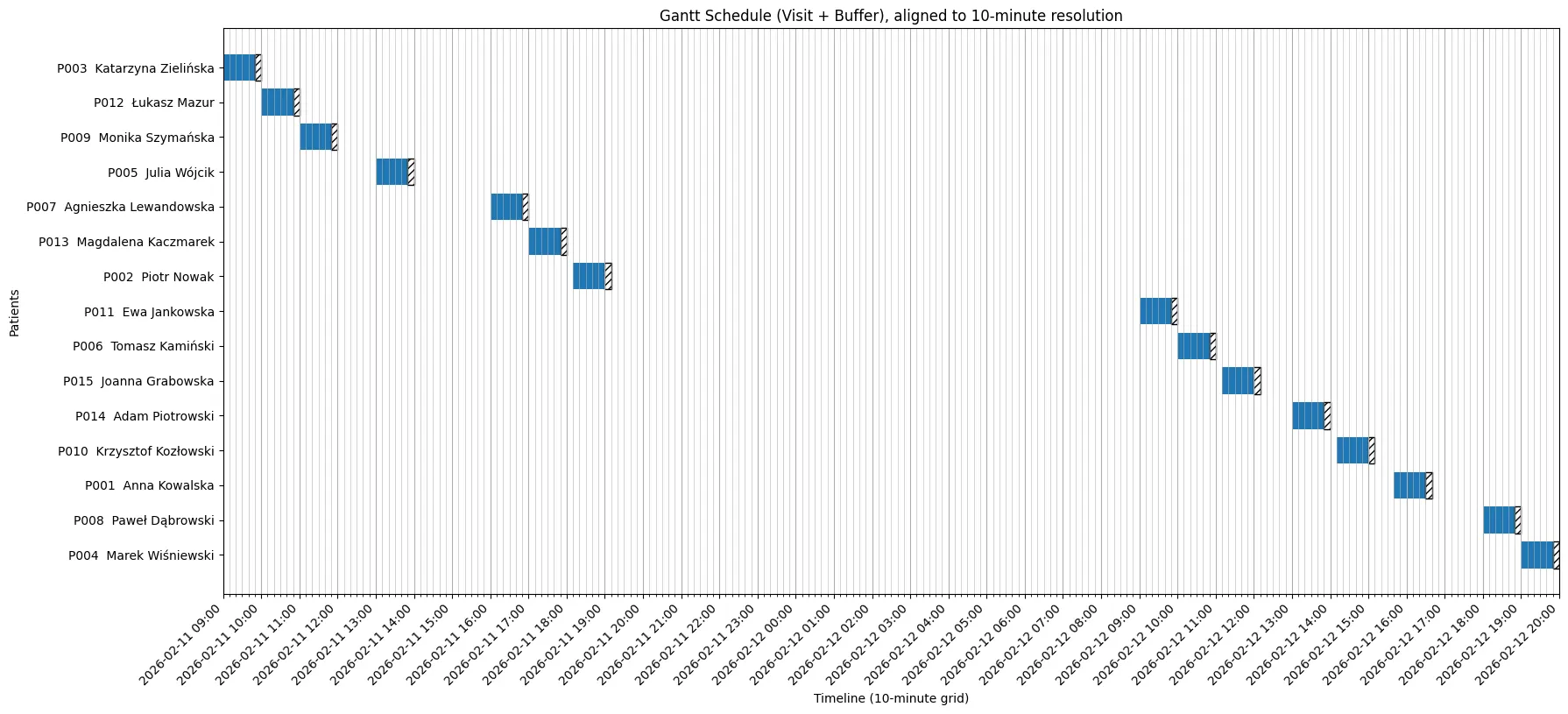
Gantt view on the reservations schedule (generated separately by an AI prompt for the above csv data file as a form of visual verification)
Final words
Looking at the Gantt — I hope you understand that we need to validate what AI generates as code. This diagram makes the output from our scheduling routine “more human-friendly”.
I looked at a few data points to test correctness. At first glance, it is correct (it means slots are not overlapping for the same doctor), but do not trust me — Check it out yourself, as it is an AI project, this may still be inaccurate and require fine-tuning, and intense unit testing would not be a bad idea.
Remember — this is only a few dozen minutes exercise with an AI, imagine what it can do if we spend days on it …
Cheers
References